Turn YouTube Comments Into Intelligent AI Conversations
Noor Hussain·October 9, 2026
Connect your YouTube channel and let BotLance monitor comments, understand questions using your business knowledge, and respond automatically while giving you complete visibility into every reply.
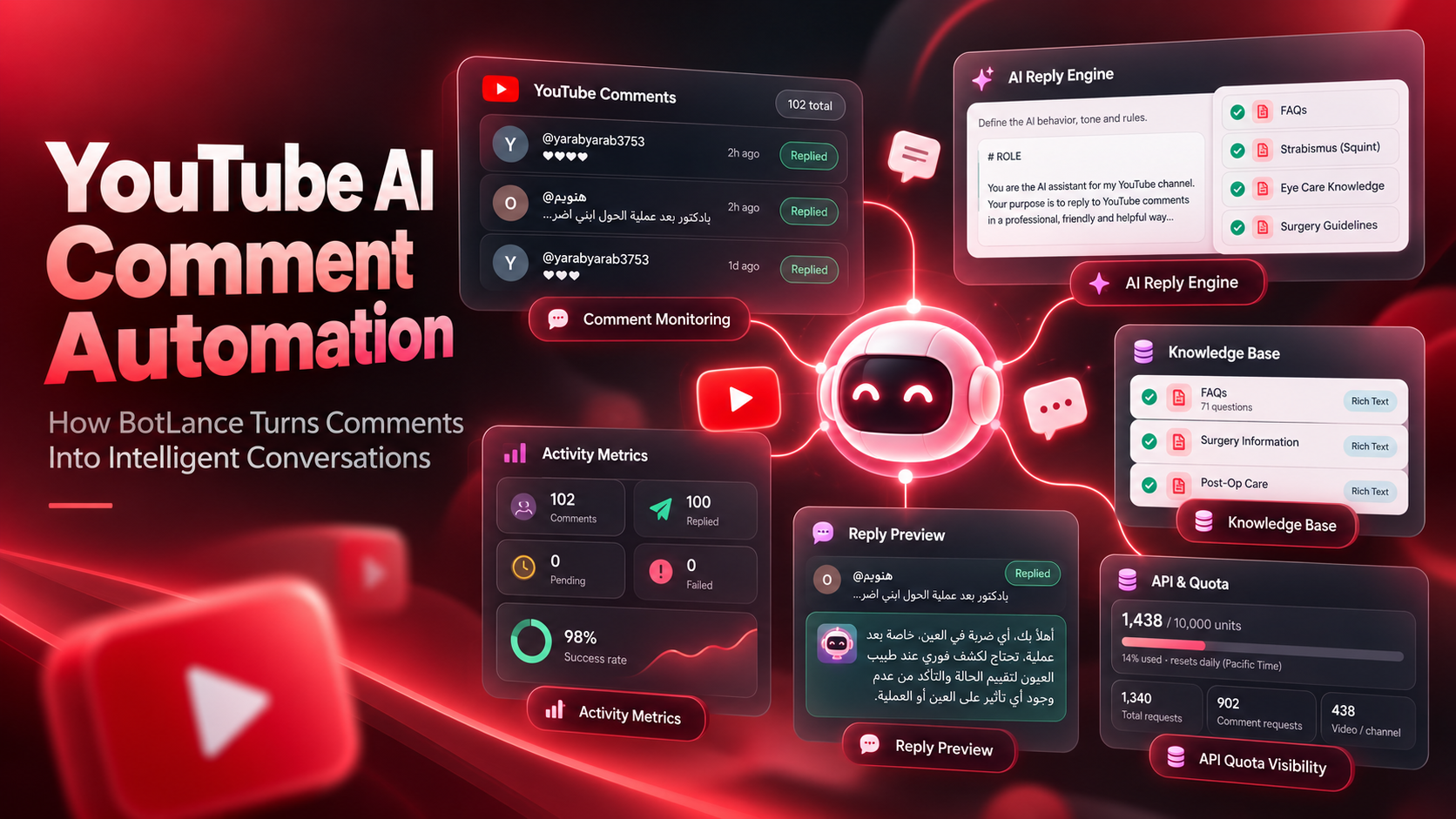
YouTube AI Comment Automation: How BotLance Turns Comments Into Intelligent Conversations
YouTube comments can become surprisingly difficult to manage as a channel grows. A new video might receive product questions, support requests, compliments, criticism, pricing questions, location enquiries, and highly specific questions that deserve more than a generic “Thanks for watching.” Replying personally is manageable when there are only a handful of comments, but once a channel has hundreds of videos and new conversations arrive every day, keeping up becomes another job of its own.
BotLance approaches YouTube differently from messaging-first channels such as Instagram or Facebook. YouTube does not need to be squeezed into a traditional DM-style inbox experience. Instead, BotLance gives the connected channel its own environment built around what actually matters on YouTube: discovering comments, understanding them, responding intelligently, tracking what happened, and giving the channel owner enough control to trust the automation.
The result is a YouTube AI comment automation system that goes considerably further than simply generating a nice-sounding reply.
Connect the Channel, Not a Complicated Chain of Video IDs
YouTube automation can become unnecessarily technical when the setup revolves around individual video identifiers, separate workflows, and repeated configuration every time new content is published. That may be acceptable for a developer building a custom workflow, but it is not how most creators and businesses want to manage their channel.
BotLance starts with the channel itself.
The user connects their Google account, grants the required YouTube permissions, and BotLance can identify the connected channel along with useful information such as its channel name, handle, subscriber count, video count, and connection status. Google officially uses OAuth 2.0 authorization for applications that need to act on behalf of a YouTube user, which allows access to be granted without giving the application the user's Google password.
From there, the business controls what BotLance should monitor. The system can work across the channel rather than requiring the user to manually find and paste the ID of every individual video. Monitoring can cover all videos or be narrowed to more recent content when that makes more sense for the channel.
That distinction matters because automation should become easier as the content library grows, not harder.
Flexible Monitoring That Fits Different YouTube Channels
Not every channel needs comments checked at the same frequency.
A highly active channel may want new comments detected very quickly. Another business may receive fewer comments and prefer less frequent polling. BotLance therefore allows the channel owner to control the polling frequency, with options ranging from frequent checks to longer intervals such as every 15 minutes.
The monitoring scope is configurable as well. A business can monitor all videos or concentrate the AI engine on more recent videos using time-based scopes such as the last 24 hours or recent multi-day periods.
This makes the channel much easier to manage at scale. A creator with a large back catalogue can choose the scope that makes sense instead of building a separate automation for every upload, while a smaller channel can simply allow BotLance to monitor everything.
There is also a manual synchronization option when the user wants BotLance to check for new activity immediately instead of waiting for the next scheduled poll.
The AI Replies Using Your Actual Knowledge
Automatic replies are only useful when the AI knows what it is talking about.
A generic model can easily respond to “Great video,” but the challenge begins when somebody asks, “How much does this service cost?”, “Is this available internationally?”, “What happens after the procedure?”, or “Which option would be better in this situation?”
BotLance connects YouTube to the same broader Knowledge Base used across the platform. The channel owner can select which relevant knowledge sources the YouTube AI is allowed to use, including FAQs, rich-text knowledge, and uploaded knowledge content supported by the YouTube reply engine.
That means the AI is not expected to invent an answer from a short prompt alone.
Businesses can maintain their information centrally inside BotLance and then decide which knowledge should be available to the YouTube agent. When a viewer asks a genuine question beneath a video, the AI can use that context to produce a response grounded in the information the business has provided.
For businesses using YouTube as an educational, support, sales, or authority-building channel, that is far more useful than simply generating different versions of “Thank you for your comment.”
Give the YouTube AI Its Own Instructions
Knowledge tells the AI what it knows. Instructions tell it how it should behave.
BotLance gives the YouTube AI Reply Engine its own instruction area where the channel owner can define the role, tone, response style, boundaries, and other behavior expected from the agent.
A professional services company may want concise and formal answers. A creator may want something warmer and more conversational. A medical or financial business may need very strict boundaries around what the AI is allowed to say. An international company may have specific rules for handling questions in different languages.
The important point is that these rules are configured at the channel level rather than being hidden inside a complicated automation chain.
BotLance also includes a reply preview, allowing the owner to enter a sample comment and see how the AI would respond using the current instructions and selected Knowledge Base before relying on those settings for real YouTube comments.
That gives the user an opportunity to refine the AI's behavior before it starts speaking publicly on behalf of the channel.
Intelligent Comment Handling Instead of Replying Blindly
Good automation should know when not to respond.
BotLance includes comment-handling rules designed to prevent common automation problems. For example, the AI can ignore replies beneath existing comments when the business only wants to process top-level comments. It can ignore comments made by the channel itself, preventing the AI from replying to its own account. It can also ignore comments that have already been processed so the same viewer does not receive duplicate responses.
These safeguards sound simple, but they are essential when an AI system is continuously monitoring a public channel.
The system also keeps comment history and processing state, which allows BotLance to distinguish between comments that have been found, replied to, are still pending, or encountered a failure.
Instead of an invisible automation running somewhere in the background, the channel owner can see what the engine is actually doing.
Every Comment and AI Reply Remains Visible
BotLance does not use a conventional messaging inbox for YouTube because the interaction model is different. Instead, the YouTube channel includes a dedicated Comments area designed specifically around public YouTube conversations.
The owner can see the viewer, original comment, related video, processing status, when the comment was received, and the AI reply associated with it. Search and filters make it easier to find specific comments, authors, videos, or reply states when the channel starts processing larger volumes.
Opening an individual comment provides an even clearer picture: the original viewer comment, the AI-generated reply, the related video, and processing information are available together.
This is important for accountability.
If an AI is publicly representing a business, the owner should be able to inspect what it said rather than simply trusting that an automation somewhere has been running correctly.
Match the Viewer's Language
A YouTube audience is rarely limited by geography.
A video published in one country may attract viewers speaking Arabic, English, French, Spanish, Urdu, or dozens of other languages. BotLance allows the reply language to follow the commenter's language, making the AI experience much more natural for international audiences.
Instead of forcing every viewer into one language simply because that is the channel's default, the reply engine can respond according to the language used in the incoming comment.
Combined with the Knowledge Base and channel instructions, this allows businesses to serve a broader audience without manually writing separate automation flows for each language.
Control Reply Length, Volume and Timing
Public AI replies should not feel uncontrolled.
BotLance gives the channel owner practical controls over how replies are generated and delivered. The maximum reply length can be limited so the AI does not turn a simple YouTube comment into an unnecessarily long response. The number of comments processed during each polling cycle can also be capped, giving the business control over throughput.
A processing delay can be introduced between replies as well.
These settings help businesses decide not only what the AI says but also how the automation behaves operationally. A small creator and a high-volume brand may use the same AI technology while needing completely different processing limits.
Built-In Retries and Duplicate Protection
Automation inevitably encounters occasional failures. An API request can fail temporarily, a connection can experience an issue, or a reply may not be delivered on the first attempt.
BotLance includes retry controls directly inside the YouTube channel settings. Automatic retries can be enabled, the maximum number of attempts can be controlled, and a delay can be placed between retry attempts.
Duplicate protection provides another layer of reliability. BotLance can avoid reprocessing comments it has already seen and can account for edited or deleted comments according to the configured settings.
This is the kind of functionality that often goes unnoticed when everything is working correctly, but it becomes extremely important once an automation is operating continuously across a real channel.
Pause AI Without Losing Visibility
There may be times when a channel owner wants AI replies temporarily stopped without disconnecting the entire YouTube channel.
BotLance separates comment monitoring from automatic replying.
The AI Reply Engine can be paused while BotLance continues tracking comments. This means a business can temporarily stop public AI responses while still maintaining visibility into activity on the channel.
The system can also be configured to automatically resume AI replies after the YouTube connection is restored.
That is considerably more practical than treating automation as a simple all-or-nothing switch.
See What the System Is Actually Doing
One of the strongest parts of the BotLance YouTube channel is transparency.
The Activity area shows operational metrics such as comments discovered, replies sent, pending comments, failed replies, success rate, the last polling cycle, and the next scheduled poll. A separate activity log provides visibility into system-level events rather than leaving the owner guessing when something changes.
This turns the AI reply engine into something measurable.
If one hundred comments were discovered and ninety-eight were successfully processed, the owner can see that. If something fails, the system can surface it instead of quietly stopping in the background.
The objective is not merely automation. It is observable automation.
YouTube AI Automation Should Feel Like a Product, Not a DIY Workflow
There are many ways to technically automate YouTube comments. A developer can connect APIs, build workflows, store processed comment IDs, call an AI model, manage retries, track quotas, and create their own monitoring system.
The question for most businesses is not whether that is possible.
The question is whether they should have to build and maintain all of it themselves.
BotLance packages those moving pieces into a dedicated YouTube channel experience. Channel connection, monitoring scope, AI instructions, Knowledge Base selection, comment rules, previews, processing limits, retries, duplicate protection, comment history, activity metrics, notifications, and API quota visibility all live around the same feature.
The creator can therefore spend more time deciding how the brand should communicate and less time maintaining the infrastructure required to make that communication happen.
From Comments to Consistent Audience Engagement
A comment section is one of the few places on YouTube where the audience can speak directly back to the creator or business.
Ignoring every comment wastes that opportunity. Responding manually to every comment becomes increasingly difficult as the channel grows. Responding automatically with shallow generic messages solves the workload problem but can easily damage the quality of the conversation.
BotLance is designed to sit between those extremes.
It uses AI to understand the incoming comment, business knowledge to provide useful context, instructions to maintain the expected behavior, and operational controls to keep the automation manageable. At the same time, it gives the channel owner visibility into the comments, replies, performance, connection health, and API usage behind the system.
The result is not simply an AI comment generator.
It is a complete YouTube AI reply engine designed to help creators and businesses stay present in their comment sections even when the audience becomes too large to manage manually.