Incoming Webhook: Receive Events from External Tools
Incoming Webhook lets external platforms send real-time events and data directly into BotLance. Receive confirmations from forms, booking systems, CRMs, ecommerce tools, and other webhook-enabled services, map the incoming data to BotLance fields, and use those events to trigger workflows and continue automation without relying on a separate middleware platform for many common use cases.
Incoming Webhook: Receive Events from External Tools
Introduction
Many customer journeys begin inside a chat but finish somewhere else.
Your AI might send a customer to a booking page, registration form, payment page, application form, or another external service. The customer completes the action—but without a way for that external service to communicate back, the original platform may never know what happened.
Incoming Webhook solves that problem.
It gives your BotLance workspace a secure endpoint that external services can call whenever an event occurs. Instead of simply sending customers away through a link and losing visibility afterward, BotLance can receive the confirmation, capture the returned information, store the data, and use the event elsewhere in the platform.
This creates a two-way customer journey rather than a one-way link.
From External Event to BotLance
Imagine your AI sends a customer a link to complete a form.
Without an Incoming Webhook, the conversation may end there. The form platform knows that the customer submitted it, but your AI platform may have no confirmation that the submission actually happened.
With BotLance, the external service can send an event back to your Incoming Webhook endpoint.
The flow becomes:
Customer → BotLance → External Form or Service → Incoming Webhook → BotLance
Now BotLance knows that the event happened and can work with the returned information.
The same concept can be used for appointment bookings, form submissions, lead updates, order events, CRM activity, application forms, and many other external processes.
A Lightweight Middleware Layer
Incoming Webhook is especially useful because it can handle many situations that would otherwise require another automation platform between your tools.
A typical setup might look like:
External Service → Zapier or Make → AI Platform
With BotLance, many webhook-based use cases can instead become:
External Service → BotLance
This doesn't mean external automation platforms are never needed. Complex multi-system automations may still benefit from dedicated automation tools. But for straightforward confirmations, event collection, data mapping, and workflow triggers, Incoming Webhook can remove an unnecessary extra layer.
That means fewer moving parts, simpler maintenance, and a more direct connection between your external services and BotLance.
Create an Incoming Webhook
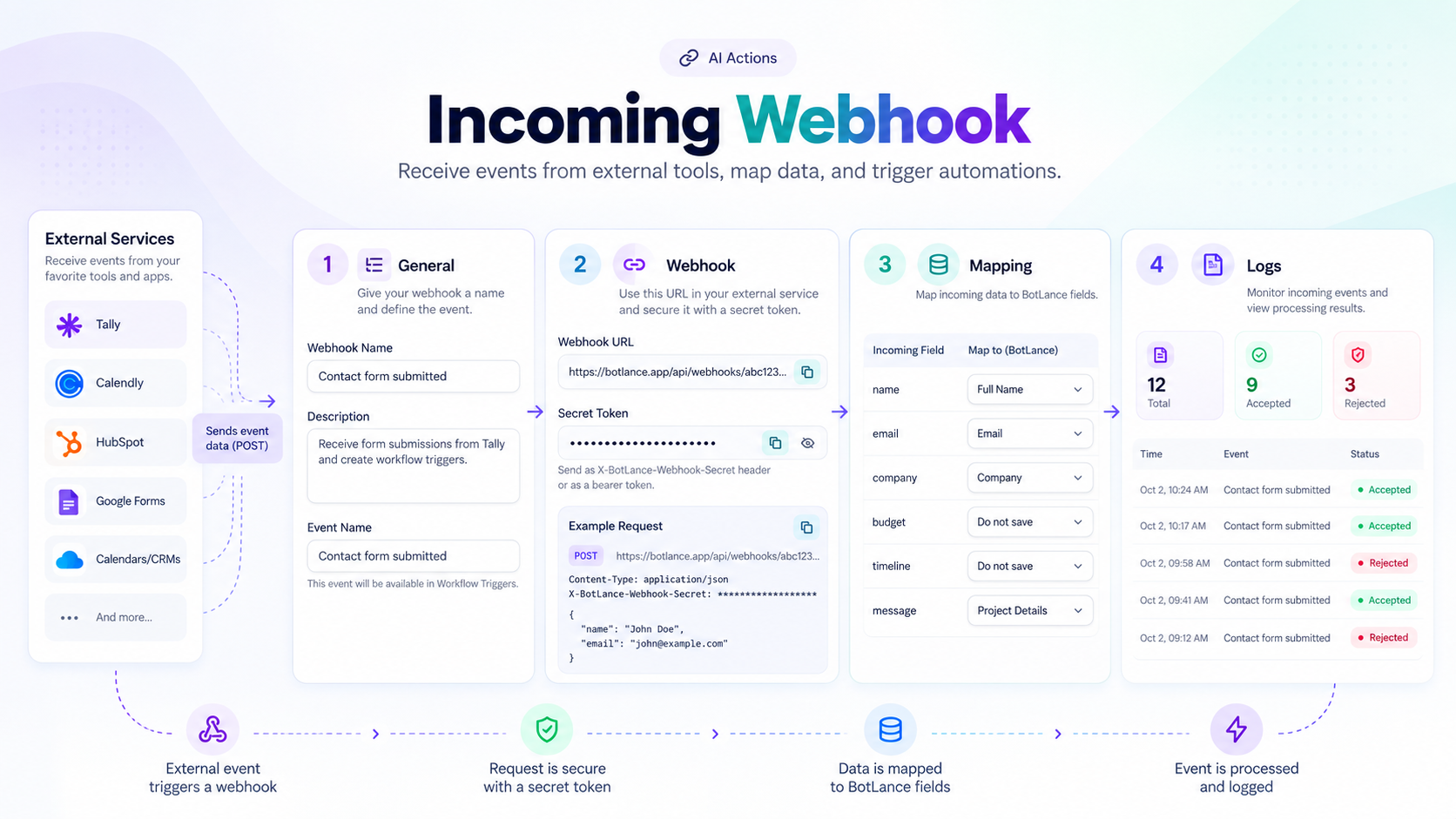
When you create an Incoming Webhook, start by giving it a clear Name and Description.
For example:
Name: Tally Form Submitted
Description: Receives new lead submissions from our website qualification form.
You also define an Event Name. This is important because the event can later be exposed inside BotLance as a Workflow Trigger.
A clear event name makes it easy to understand exactly what happened when you're building automations later.
Examples might include:
Form Submitted
Appointment Booked
Order Confirmed
Application Received
Lead Qualified
Your Webhook URL
BotLance generates a unique Webhook URL for the Incoming Webhook.
You copy this URL and add it to the webhook configuration of the external platform.
Whenever the selected event occurs, that external service sends a request to the BotLance endpoint.
For example, a form platform may send a POST request containing the submitted customer's name, company, budget, timeline, and other responses.
The external platform sends the event. BotLance receives it.
Secure Incoming Requests
Incoming Webhooks can also be protected using a Secret Token.
This allows BotLance to verify that incoming requests originate from a service that knows the correct secret rather than accepting arbitrary requests from unknown sources.
Depending on the external platform, the secret can be sent using an appropriate header, authorization mechanism, or supported request field.
BotLance stores the secret securely and validates incoming requests before accepting them.
If the supplied secret is incorrect, the request can be rejected instead of being processed.
Request Format
Incoming Webhooks receive external events as HTTP requests, commonly using a POST request with a JSON payload.
The payload can contain whatever information the external service provides.
For example, a form submission might send information such as:
{
  "name": "Jane Doe",
  "company": "Example Inc.",
  "email": "jane@example.com",
  "budget": "Under $5,000",
  "timeline": "1–3 months"
}
BotLance receives this information and makes it available for further processing.
You don't need every external platform to use exactly the same data structure. The Mapping system allows you to decide which incoming values actually matter to your workspace.
Mapping Incoming Data
The Mapping tab is where Incoming Webhook becomes much more than a basic webhook receiver.
Once BotLance has received a sample event, it can display the fields sent by the external service along with example values.
You can then decide where each incoming value should be stored.
For example, an incoming Name field can be saved as the BotLance Full Name system field, while Company / Organization can be mapped to the Company field.
Other information may be mapped to custom fields when you want to preserve it for future use.
And you don't have to save everything.
If the external service returns fields that aren't relevant to your use case, simply leave them unmapped.
This gives you control over exactly which external data becomes part of your BotLance contact and automation data.
More Than Data Mapping
Mapping is not only about storing information.
Once BotLance understands the incoming event and its data, that event can become part of a much larger automation.
For example, suppose an external booking platform confirms that a customer has successfully booked an appointment.
BotLance receives:
Appointment Booked
The returned information can be mapped to the relevant fields, and the event itself can then be used as a Workflow Trigger.
A workflow could then continue the customer journey automatically.
The same principle can apply to:
Form Submitted → Start qualification workflow
Appointment Booked → Send confirmation
Order Confirmed → Begin post-purchase workflow
Application Received → Update customer data and continue automation
The webhook therefore acts as the bridge between an external event and everything that can happen next inside BotLance.
Use Incoming Webhooks as Workflow Triggers
One of the most powerful parts of Incoming Webhook is its connection with AI Workflows.
The Event Name you configure can be made available as a trigger inside the Workflow Builder.
This means the workflow doesn't have to begin when a customer sends another chat message.
It can begin when something happens somewhere else.
For example:
A customer is talking with your AI.
The AI sends them a booking link.
The customer books outside BotLance.
The booking platform sends the confirmation to your Incoming Webhook.
BotLance receives the event.
A workflow starts automatically.
The workflow can then continue the customer journey based on the confirmed booking.
This closes the gap between conversations and external actions.
Know What Actually Happened
Without an incoming event, sending a link usually tells you only that the link was provided.
It doesn't tell you whether the customer completed the action.
Incoming Webhook gives BotLance that missing confirmation.
Instead of assuming:
"The customer probably submitted the form."
BotLance can know:
"The form submission event was received."
That distinction becomes extremely important when building reliable automations.
The same applies to appointment bookings, registrations, applications, orders, lead forms, and many other customer actions.
Webhook Logs
The Logs tab gives you visibility into the requests received by your webhook.
You can see information such as total requests, accepted events, rejected requests, HTTP status, payload size, processing time, and errors.
Individual requests can also be inspected when you need more detail.
This is particularly useful during setup and troubleshooting. If an external platform says it sent the webhook but nothing happened in BotLance, the logs help you determine whether the request arrived, whether it was accepted, and why it may have been rejected.
For example, an invalid secret can be identified immediately instead of leaving you guessing why an event wasn't processed.
Works With Many External Services
Incoming Webhook isn't tied to one provider.
Any compatible service capable of sending webhook requests can potentially send events into BotLance.
Common examples include form platforms, booking systems, CRMs, ecommerce platforms, internal business applications, lead systems, and proprietary services.
This gives you a flexible way to bring external activity into BotLance without waiting for every platform to have a dedicated native integration.
Incoming Webhook and Custom Actions
Incoming Webhook and Custom Actions solve opposite sides of the same problem.
Custom Actions allow BotLance to send requests out to external systems.
Incoming Webhook allows external systems to send events into BotLance.
Together, they create a powerful two-way connection:
BotLance → External System
and
External System → BotLance
This makes it possible to build AI experiences where conversations, external services, data, and workflows work together instead of operating as disconnected systems.
From Conversation to Complete Customer Journey
Incoming Webhook changes what happens after your AI sends someone somewhere else.
The journey no longer needs to stop at the external link.
BotLance can receive the result, capture relevant data, update fields, verify the event, and trigger the next automation.
That makes Incoming Webhook especially valuable for businesses that rely on forms, appointments, external checkout experiences, CRM events, or other systems outside the conversation itself.
Instead of simply directing customers to the next step, BotLance can know when that next step actually happened—and continue the journey automatically.