
Stateful Variables: Give Your AI Persistent Memory
Stateful Variables give your AI agent a persistent conversation state that goes beyond ordinary AI memory. They allow the agent to store live values, perform calculations, maintain scores, remember important information, and use that data throughout a conversation across supported channels.
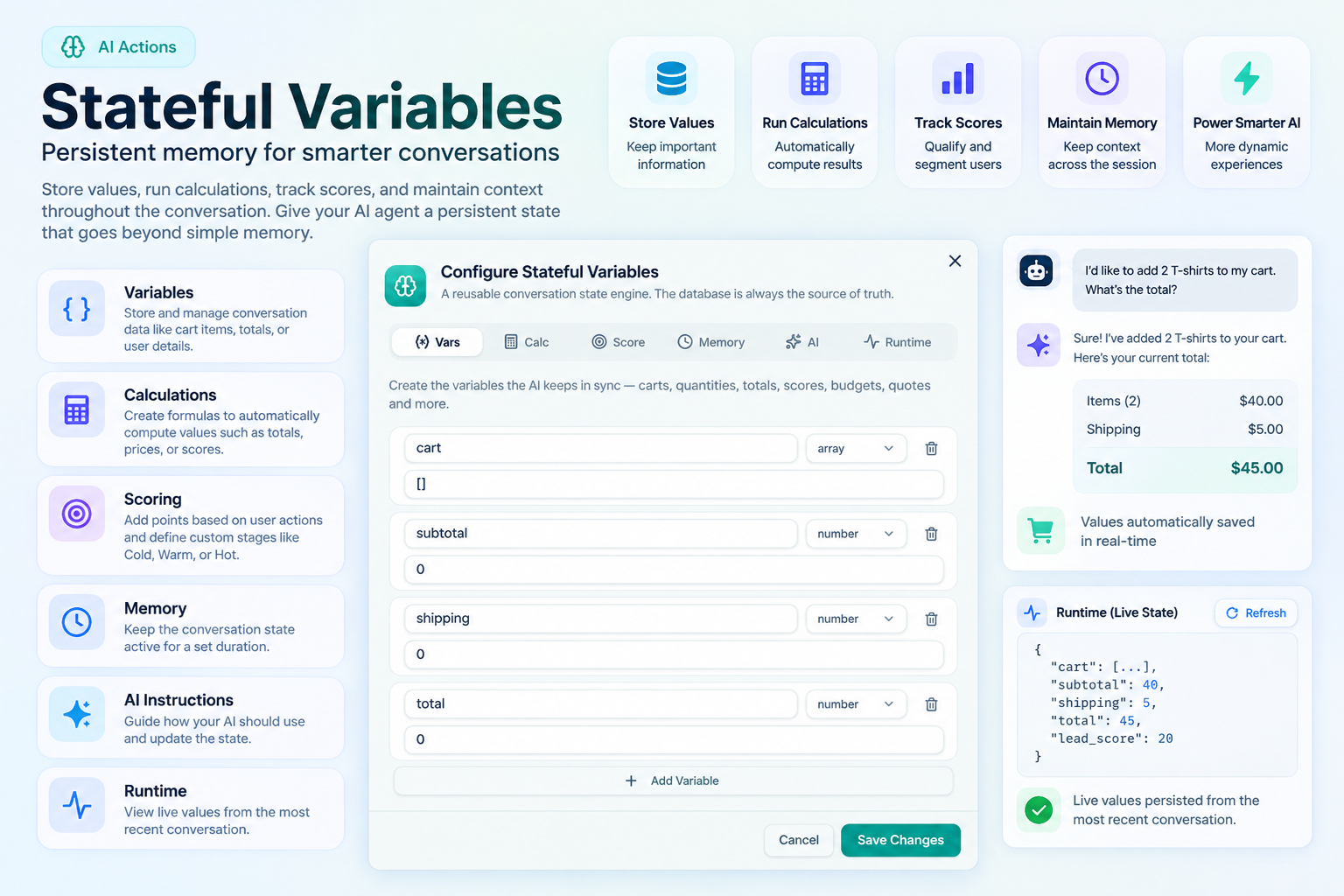
Stateful Variables: Give Your AI Persistent Memory
Introduction
AI can understand conversations naturally, but some business experiences require more than understanding the current message. An AI agent may need to remember a customer's selections, keep track of quantities, calculate a total, maintain a lead score, or carry important information throughout an ongoing conversation.
Stateful Variables are designed for exactly this purpose.
They give your AI agent a persistent conversation state that is stored outside the model itself. Instead of relying entirely on what the AI can remember from the conversation, important values can be stored and updated in a structured state, with the database acting as the source of truth.
This makes Stateful Variables particularly useful for advanced AI experiences where information needs to remain accurate and synchronized as the conversation changes.
How Stateful Variables Work
Stateful Variables allow your AI to create and maintain structured values while a customer interacts with your agent.
For example, imagine a customer is shopping through an AI assistant. During the conversation, the customer adds products to a cart, changes quantities, asks about pricing, and eventually requests the total.
The AI can maintain values such as the cart, subtotal, shipping cost, and total as the conversation progresses.
If the customer later asks:
"What's my total now?"
the AI doesn't have to recreate the calculation from scratch. The current values are already stored and can be used to provide the answer.
The same principle can be applied to lead qualification, budgets, preferences, selections, scores, and many other types of conversational data.
Variables
The Vars section is where you define the information your AI should keep track of.
A variable can have a specific type, such as a number or an array, and an initial value. As the conversation progresses, these values can be updated based on what the customer says and what happens during the interaction.
For example, you could create a cart variable to store selected products, a quantity variable to track the number of items, or a budget variable to remember the customer's stated budget.
Because these values are structured and persisted, your AI can work with them consistently instead of treating every piece of information as temporary conversational text.
Calculations
The Calc section allows your AI to automatically calculate values based on your stored variables.
You can create formulas for things such as subtotals, totals, quantities, scores, or other business calculations. Calculations can use supported functions such as ROUND, MIN, MAX, ABS, SUM, and COUNT.
For example, if your cart contains products with prices and quantities, a calculation can automatically determine the subtotal. Another calculation can then combine the subtotal with shipping to produce the final total.
Whenever the underlying values change, the related calculations can be recomputed automatically.
This is especially useful when your AI needs to handle dynamic numbers rather than simply provide static information.
Scoring
The Score section lets you create scoring rules and define stages for the resulting score.
This can be useful for lead qualification, customer segmentation, eligibility checks, or any conversational experience where different actions should occur based on a customer's responses.
For example, you could award points when a customer provides their phone number, shares their email address, has an urgent requirement, or meets a particular budget threshold.
You can then define ranges for the final score and assign meaningful labels such as Cold, Warm, or Hot.
As the conversation progresses and conditions are met, the score can be updated automatically.
Memory
The Memory section controls how long the conversation state remains available after a period of inactivity.
By default, conversation state automatically expires after 24 hours of inactivity. This allows your AI to maintain useful context during an ongoing customer interaction while keeping the stored conversation state from remaining active indefinitely.
The memory system is particularly useful when a conversation involves multiple steps and the customer expects the AI to remember information they have already provided.
AI Instructions
Stateful Variables can also work alongside AI Instructions, giving you control over how your AI should use the stored state.
This allows you to define rules for how the AI should interpret, update, or use particular variables during conversations.
For example, you can instruct your AI to update a customer's cart when they select a product, maintain a score when certain conditions are met, or use stored values when responding to follow-up questions.
This combination of AI reasoning and structured state allows you to build experiences that are much more dynamic than a standard chatbot.
Runtime
The Runtime section provides a live view of the persisted values from the most recent conversation.
These values are read-only and represent the state that was actually stored during runtime. They do not overwrite your default configuration.
This is particularly useful when testing or troubleshooting a Stateful Variable setup. You can start a conversation, interact with your AI, and then return to the Runtime section to see which values were persisted.
For example, after a customer asks about a product price or changes a quantity, you can inspect the runtime state to see the updated values and verify that your variables and calculations are working as expected.
More Than AI Memory
The key difference with Stateful Variables is that your AI is not simply relying on its conversational memory.
Important information is maintained as structured data outside the model, with the database serving as the source of truth. The AI can then use that state when it needs to understand what has already happened and determine what should happen next.
This makes Stateful Variables ideal for experiences where accuracy and continuity matter.
You can use them for shopping carts, product quantities, pricing calculations, budgets, lead scores, customer selections, qualification flows, and many other dynamic experiences.