
Data Tables: Import, Manage, and Connect Structured Data to Your AI Agent
Learn how BotLance Data Tables transforms CSV and Excel spreadsheets into structured, searchable business knowledge. This guide covers importing and creating tables, managing rows and columns, understanding supported data types, searching and filtering records, and how AI agents use relevant table data to answer customer questions across supported channels.
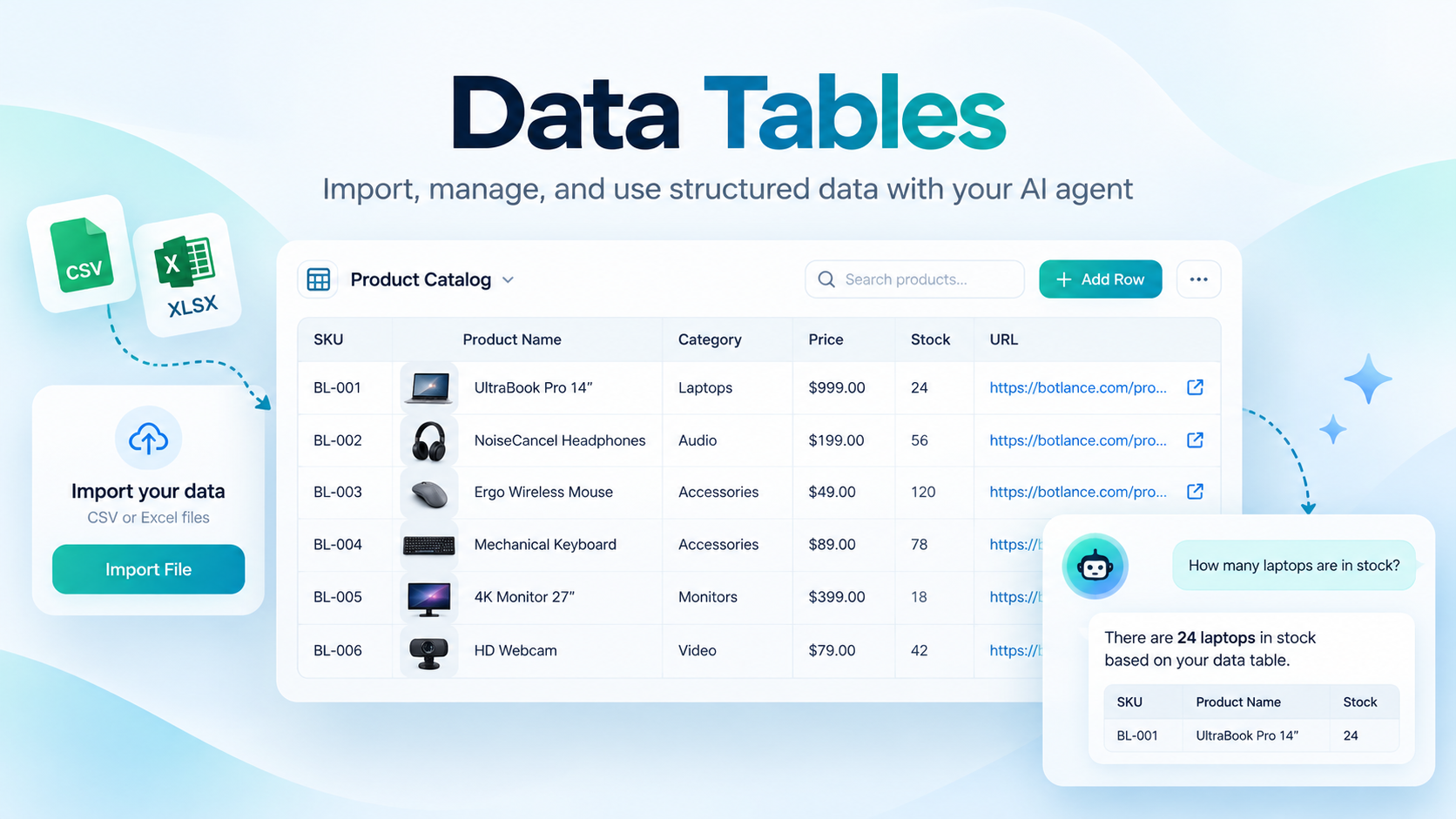
Data Tables: Import, Manage, and Connect Structured Data to Your AI Agent
Introduction
The BotLance Knowledge Base is where you provide the information your AI agent needs to understand your business and answer customer questions accurately. Instead of relying only on general AI knowledge, your agent can reference the information you provide about your products, services, policies, pricing, and other business details.
BotLance supports several types of knowledge, including FAQs, Text Content, uploaded files, website content, and Data Tables. Each source serves a different purpose, allowing you to organize business information in the format that works best for you.
Data Tables is designed specifically for structured information, such as product catalogs, prices, inventory, property listings, service packages, SKUs, and other records that are naturally organized into rows and columns.
With Data Tables, you can import existing spreadsheets, manage your records in a familiar table interface, and make relevant information available to your AI agent without converting an entire spreadsheet into a large text document.
Understanding the BotLance Knowledge Base
Before exploring Data Tables, it helps to understand the other knowledge sources available in BotLance.
FAQs
FAQs allow you to create individual questions and answers about your business. They work particularly well for frequently asked questions such as opening hours, delivery information, cancellation policies, payment methods, and general customer inquiries.
Simply add a question, provide its answer, and save it. Your AI agent can reference this information when responding to relevant customer questions.
Text Content
Text Content is useful for information that is better explained in paragraphs rather than individual questions and answers. You can use it to describe your business, explain services, provide detailed instructions, or document policies.
The rich-text editor allows you to organize information with headings, paragraphs, and formatting, making it suitable for longer business descriptions and guidance.
Files
The Files section allows you to upload supported documents containing business information. This is helpful when your knowledge already exists in documents such as PDF guides, brochures, manuals, or company information files.
BotLance processes supported document content so the AI agent can reference relevant information when needed.
For large structured spreadsheets, however, Data Tables is the recommended option because it preserves the original rows, columns, and data types.
Website
Website Knowledge allows you to provide website content as a source of information for your AI agent. This is particularly helpful if your business already maintains detailed product, service, or informational pages online.
You can add website URLs and use BotLance's website content tools to make supported page information available as knowledge.
Together, these sources provide a flexible Knowledge Base for different business needs.
What Are Data Tables?
Data Tables is a structured data management feature within the BotLance Knowledge Base. It allows you to store business records in a spreadsheet-style format, where each column represents a field and each row represents an individual record.
For example, an online store might create a Product Catalog containing columns for Product Name, SKU, Category, Color, Price, Stock, and Description. Each product would occupy its own row, with its details stored in the appropriate columns.
Similarly, a real estate business might create a Property Listings table containing Property Name, Location, Property Type, Bedrooms, Price, Availability, and Listing URL.
Unlike ordinary text documents, Data Tables preserves the structure of this information. Numbers remain numeric values, dates can be stored as dates, and identifiers such as SKUs can be maintained as text.
This makes it easier for BotLance to search, filter, and retrieve specific records when customers ask detailed questions.
Creating Your First Data Table
To get started, open your BotLance dashboard and navigate to Knowledge Base → Data Tables.
The Data Tables page displays your existing tables along with their names, row counts, column counts, storage usage, and last-updated information.
Click New Table to create a table manually. Enter a descriptive name, such as Product Catalog, Property Listings, or Service Packages.
Next, add the columns your table requires. Each column should have a clear name and an appropriate data type. For example, a product catalog might include SKU as Text, Product Name as Text, Price as Number, and Product URL as URL.
Once your table is created, open it to access the spreadsheet editor. You can start adding records using the Add Row button.
You can create multiple tables within the same workspace to keep different types of business information separate and organized.
Importing CSV and Excel Files
If your business information is already stored in a spreadsheet, you do not need to recreate it manually.
BotLance supports importing CSV and Excel files, including XLSX and supported XLS formats.
Navigate to Data Tables and click Import CSV / Excel. Select the file you want to upload from your device.
BotLance reads the spreadsheet, identifies the header row, detects populated columns, and prepares the records for import. For Excel workbooks, the current importer uses the first worksheet, so place the data you want to import there.
You will then see an import preview displaying sample rows and detected column types. Review this preview carefully to confirm that your product names, prices, identifiers, descriptions, and other values appear correctly.
You can adjust the detected column types before completing the import. Once everything looks correct, click Import Table.
BotLance creates the table and stores the imported records as structured data, ready for management and AI retrieval.
Handling Empty Rows and Columns
Many spreadsheets contain unused rows or columns because of formatting, formulas, or previous edits. These extra cells can make a spreadsheet appear much larger than the actual amount of business data.
BotLance helps keep your imported tables clean by excluding completely empty rows and columns that contain no meaningful values.
For product catalogs containing descriptive fields, it can also exclude rows that contain only identifiers such as automatically generated SKUs, when those rows have no corresponding descriptive product information.
For example, if a spreadsheet contains hundreds of generated SKU entries but only a smaller number of completed product records, the importer can skip the incomplete identifier-only records.
The import screen displays information about skipped rows and columns so you can review what will be included.
Important: If your business intentionally uses identifier-only records, add the necessary descriptive information before importing. Always review the import preview to ensure that the intended records are preserved.
Supported Column Types
Data Tables supports five primary column types: Text, Number, Date, Yes / No, and URL.
Text is suitable for product names, SKUs, categories, descriptions, colors, addresses, and other written information. Identifiers such as SKUs should generally remain Text, even when they contain numbers, so leading zeros and formatting are preserved.
Number is intended for numeric information such as prices, quantities, stock levels, measurements, and bedroom counts. Using a numeric type allows the system to apply comparison filters when supported.
Date is used for calendar dates, such as an appointment date, listing date, or scheduled availability date.
Yes / No represents boolean information, such as whether a product is available or a service is enabled.
URL stores web addresses, including product pages, property listings, and other relevant links.
During spreadsheet import, BotLance attempts to detect suitable column types automatically. You should still review the detected types, especially when a column contains mixed formats, formatted prices, or dates.
If values cannot be converted to the selected type, the importer may ask you to correct them before proceeding.
Managing Tables and Records
After creating or importing a table, you can open it from the Data Tables list.
Each table opens in a dedicated, full-width spreadsheet-style view. The interface displays clearly separated rows and columns, making it easier to review large catalogs and detailed business records.
To add a record, click Add Row, enter the appropriate values, and save. To update an existing record, use its Edit action or double-click a cell to open the row editor.
You can also delete individual rows that are no longer required. Deleted information should be reviewed carefully because removing a record also removes it from the data available for future retrieval.
If you need an additional field, click Add Column and provide its name and data type.
The table list also provides management options for renaming and deleting tables. Deleting an entire table removes the records it contains, so ensure that the information is no longer needed before confirming the deletion.
Data Tables displays storage usage in whole megabytes. Smaller tables may display 0 MB even when they contain valid information, because their stored data occupies less than one megabyte.
Searching and Filtering Table Data
Data Tables includes search and filtering tools to help you find specific records without manually browsing every row.
You can search the table using product names, SKUs, categories, or other stored text. This is particularly useful when working with large catalogs containing hundreds or thousands of records.
Filters allow you to narrow results using supported conditions. For example, you might filter a Price column to find values below a certain amount or filter a Category column to locate a specific group of products.
Because Data Tables stores supported values using their appropriate data types, the system can perform structured comparisons rather than treating every value as ordinary text.
Search and filtering operations are particularly useful when checking information yourself before testing how your AI agent responds to customer questions.
How Your AI Agent Uses Data Tables
One of the most important benefits of Data Tables is that it connects structured business information with your BotLance AI agent.
When a customer asks a question related to stored business data, the AI retrieval system can search the relevant tables and identify matching records.
For example, imagine that your business has imported a product catalog containing hundreds of products. A customer asks:
"What is the price of product SHO-0001?"
The retrieval system can look for the matching SKU and retrieve its stored product information. The AI then uses that information to generate a customer-friendly response.
Another customer might ask:
"Do you have any products priced under 600 AED?"
For supported queries, BotLance can apply numeric filtering to the appropriate price column and retrieve matching records.
The same approach can be useful for property searches, service packages, inventory questions, and other structured business information.
Structured Retrieval Instead of Entire Spreadsheets
Traditional document-based knowledge often involves processing information as text. That works well for policies, explanations, and general business details, but it is not always ideal for large product catalogs or numerical information.
Data Tables takes a different approach.
Your records remain organized in the database, and the retrieval system requests a limited set of potentially relevant rows based on the customer's question.
BotLance combines structured filtering for supported exact conditions with keyword relevance for descriptive information. The selected records are then provided to the AI model as factual context.
This approach reduces the amount of unnecessary information sent to the model and helps the agent produce more grounded answers.
However, Data Tables is not an unrestricted database query engine. Complex multi-condition questions or descriptions that do not closely match stored information may require clarification or further improvements to retrieval. For best results, keep your column names and values consistent.
Avoiding Incorrect Answers
The quality of an AI response depends on the accuracy and completeness of the information stored in your Knowledge Base.
If a product price is missing, the AI should not invent one. Similarly, if availability information is outdated, the AI cannot automatically know that stock has changed unless the stored data is updated.
For this reason, businesses should maintain accurate records and test their AI agent using real questions before relying on Data Tables for customer-facing information.
Using Data Tables Across Communication Channels
Data Tables is designed to be a shared Knowledge Base resource within your BotLance workspace.
The retrieval integration covers the Website Chatbot and supported AI-powered messaging channels, including WhatsApp, Instagram, Facebook Messenger, Telegram, and Email, as well as supported AI comment and automation workflows.
For example, a customer asking about a product price through WhatsApp can receive an answer based on the same workspace table that the Website Chatbot uses. Similarly, an Instagram customer can ask about a product SKU without requiring you to create a separate product catalog for Instagram.
There is no need to upload the same spreadsheet separately for every connected channel.
Channel access depends on your workspace's enabled features, successful channel configuration, and whether AI replies are active for the particular channel. Public comment replies may also follow additional platform-specific rules about response length and content.
The dedicated live telephone Realtime Voice Agent is separate from this text-based Data Tables integration.
Recommended Practices for Better Results
When preparing a spreadsheet, use clear, descriptive column names such as Product Name, Price, Category, SKU, Stock, or Description. Avoid unclear headings that make the purpose of a field difficult to understand.
Keep each row focused on a single record. For example, a product catalog should generally contain one product or product variation per row, depending on how you manage inventory.
Avoid combining unrelated information into one cell when that information could be stored in separate columns. If customers frequently ask about colors, sizes, and prices, keeping those values in distinct columns can make filtering and retrieval more reliable.
Use consistent values for categories, currencies, and availability statuses. For example, avoid mixing several different currency formats in the same numeric column. Where necessary, store the currency in a separate field.
Keep identifiers unique whenever possible. A reliable SKU or product code makes exact lookups easier and reduces confusion between similar products.
Finally, update your tables whenever product details, prices, stock levels, or other business information change.
Import Limits and Considerations
To maintain performance and reliability, Data Tables currently applies several import limits. Supported uploads are limited to approximately 12 MB per file, with up to 50 populated columns and 50,000 populated rows per import. Individual cell values also have a maximum supported length.
Larger files may need to be divided into smaller datasets before importing.
The current CSV and Excel import process creates structured records in BotLance. It should not be treated as automatic, continuous synchronization with the original spreadsheet.
If your source spreadsheet changes after importing, those changes will not automatically appear in BotLance simply because the original file has been updated. You should update the stored records as needed.
Similarly, Data Tables should not be treated as a replacement for a complete inventory management system, accounting platform, or external business database. Its primary purpose is to provide organized, searchable business knowledge for your AI agents.